In this article
A good website admin is where a business changes the things that change often: prices, the offer, opening hours, photos or news. No developer, no waiting and no fear of breaking something. If you email your supplier for every small tweak today, an admin is the first thing worth sorting out.
Below we look at why companies rarely update their sites, what a good admin should do and when an off-the-shelf content system is enough. Our example is Čelentano, a restaurant in Řepy that updates its daily menu on the website itself.
Why companies never update their website
Most company websites go stale not because nobody cares, but because changes are a hassle. You either write to a developer and wait, or log into a complicated system where you are afraid to click anything.
And it shows: old prices, last year's offers, opening hours that no longer apply. A customer who comes because of the website and finds a closed door or a different price will not trust it next time.
- Changes cost money, so they are put off until there are enough of them.
- The system is complicated and only one person in the company knows it.
- There is no certainty that an edit will not break the layout.
- The data lives elsewhere: the menu in Excel, prices in a PDF, news on Instagram.
An outdated site hurts on Google too. When the opening hours on the website differ from those in your business profile, neither the search engine nor the customer knows which to trust. And a site that has not changed in years looks like a business that may have closed. A website admin fixes this by letting the person who knows about a change make it the moment it happens.
What a website admin should do
A website admin should do exactly what your business changes, and nothing more. A restaurant changes its menu, a salon its price list, an agency its listings. Every extra button is another place to make a mistake.
You can tell a good admin by the fact that someone from the company manages it first time without a manual. Fields are named after things you know from daily work, not after technical page elements.
- Forms instead of a page editor. Fill in a name, price and description, the design takes care of itself.
- A preview before publishing, so you see what the change will look like.
- Works on mobile, because you often update the menu or an offer between two other tasks.
- Scheduling, for example news that only appears on Monday.
- Change history, so anything deleted by mistake can be restored.
An admin should look like your work, not like a developer's.
Custom admin or WordPress and Wix
Off-the-shelf systems like WordPress or Wix come with their own admin. For many businesses that is enough, especially when mostly text and photos change. We work with them ourselves and part of our portfolio runs on them.
The downside is that they are generic. You edit blocks of a page, not your data. To change the price of one dish, you hunt for it in the page text and watch the spacing. And the more people touch the site, the easier the design falls apart.
A custom admin makes sense when the same type of content changes again and again: a daily menu, a price list, apartment listings, event dates. We build a simple form for exactly that content and the site pulls its data from it. We cover the choice in more detail in Wix or a custom website?
How we handle it
First we ask what you change and how often. If it is a few texts a year, we do not build a custom admin and make the changes as part of website care. If it changes every day, we build a form anyone on the team can use.
Example: the daily menu at Čelentano
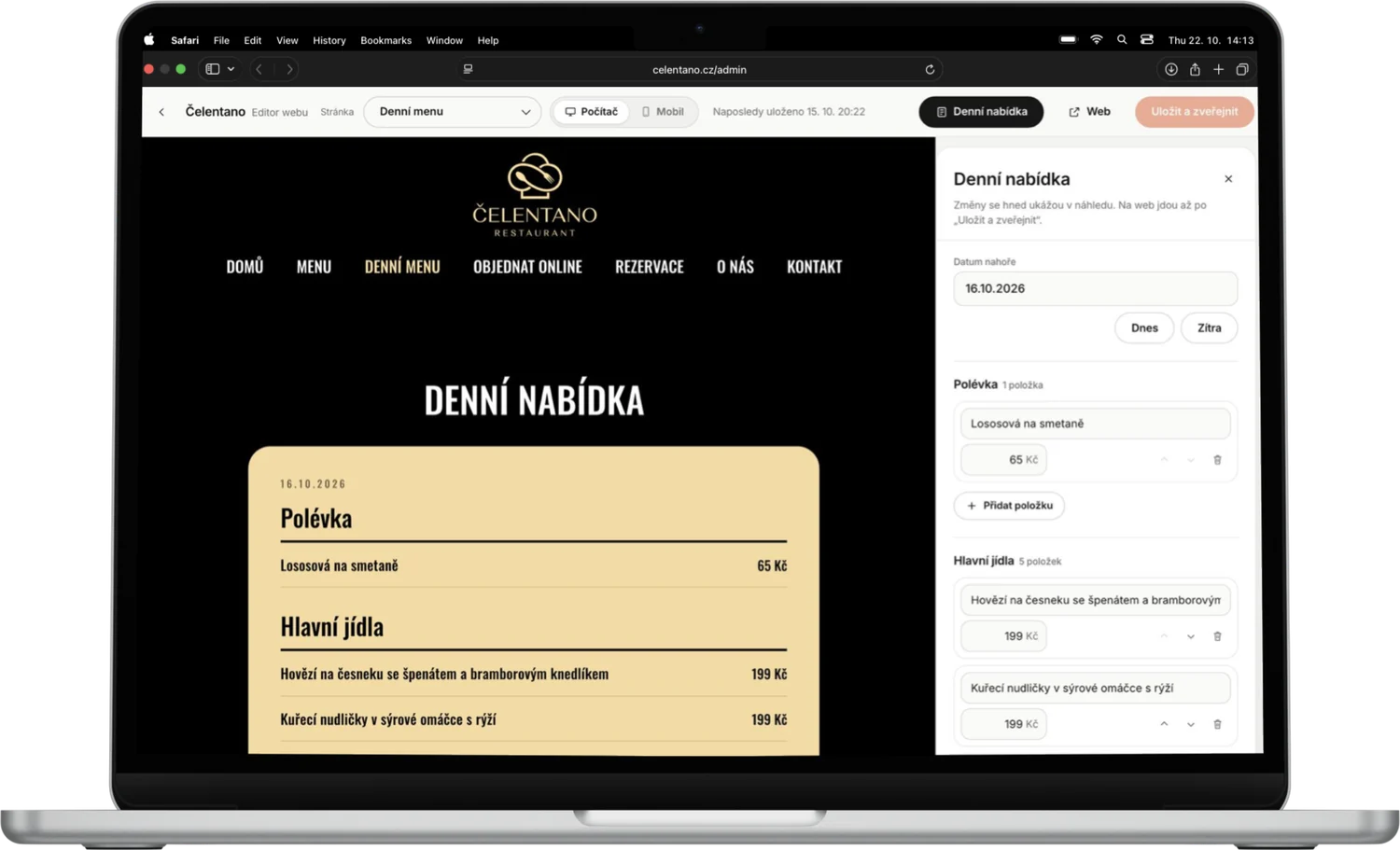
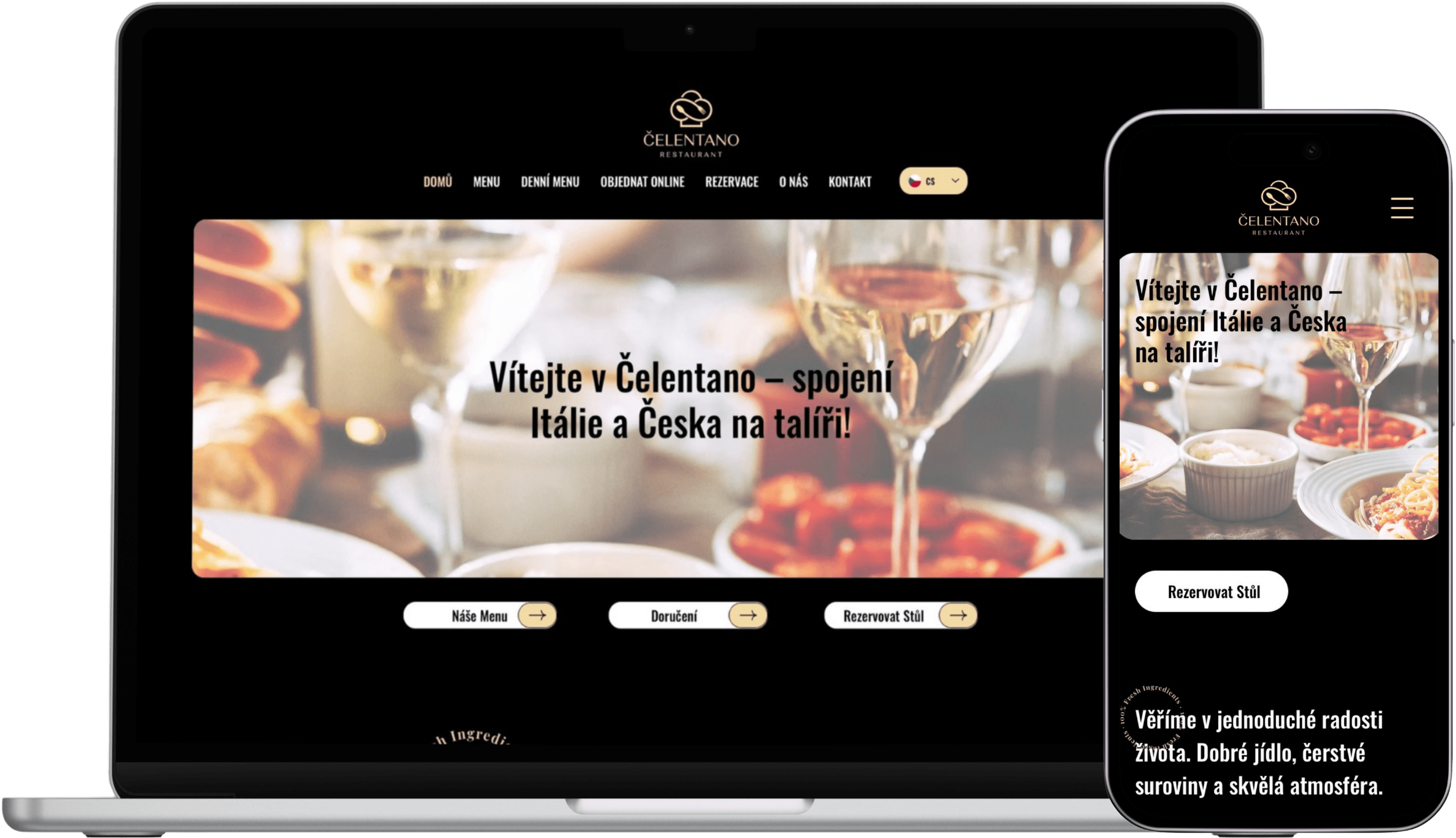
Čelentano is a family Italian restaurant and pizzeria in a shopping centre in Řepy. Its website has the menu, the daily menu, online ordering and table booking. The daily menu changes constantly, and if the restaurant had to write to us every time, the site would never be up to date.
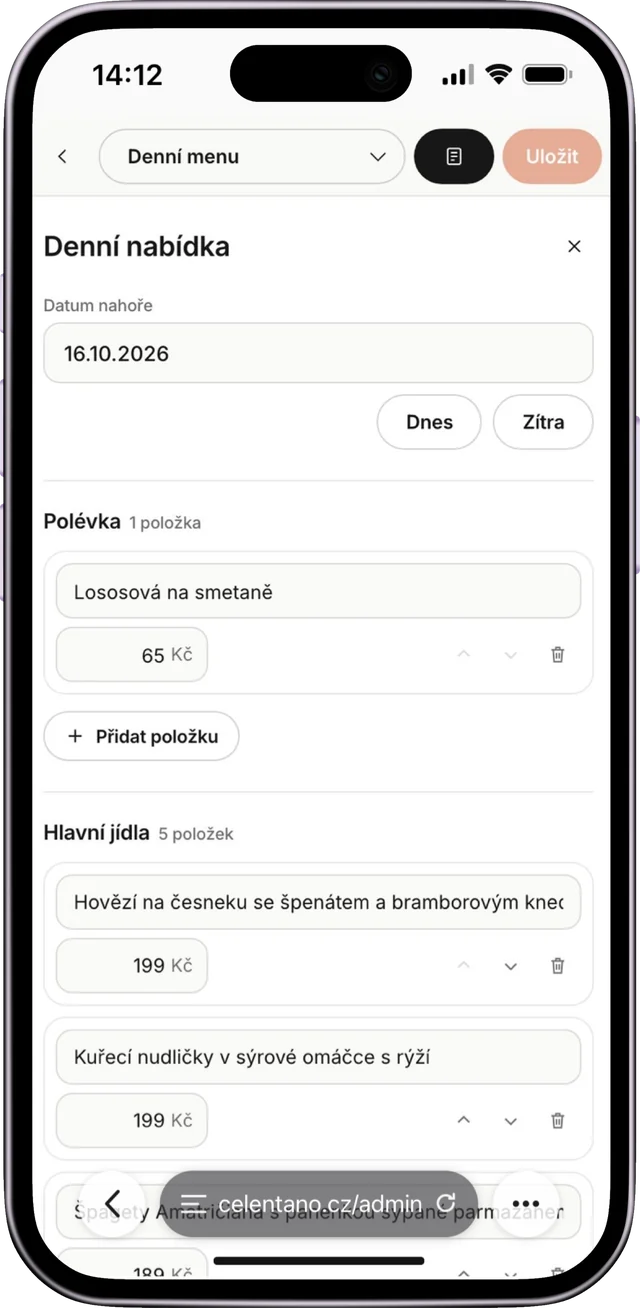
So the restaurant updates the daily menu itself. The restaurant fills the dishes and prices into a simple form and the site shows them in the same design as the rest of the page. Nobody has to think about fonts, alignment or how the menu looks on a phone.
- 1Log into the website admin.
- 2Fill in the dishes of the day and their prices.
- 3Save, and the menu appears in the same design as the rest of the site.
Guests on mobile see what is actually cooking, and the restaurant no longer copies the menu into several places. More about the whole site in the Čelentano case study, and about restaurant websites in Restaurant website.
Security and user roles
Once several people use the admin, it is worth deciding who may do what. Staff change the daily menu, the owner changes prices and opening hours, and none of them need access to the settings of the whole site.
Everyone has their own login, so you can see who changed what, and when someone leaves you simply remove their access. No passwords on a note by the till. Backups and updates are on us as part of website care, which starts at CZK 490 a month.
We use the same principle in larger internal systems, where access and roles are one of the core modules. If your company needs more than website content, read When a company outgrows Excel.
What an admin costs and how to start
The price depends on what the admin has to manage. A simple form for one type of content is a different job from a system with roles, scheduling and links to other tools. Either way you get a fixed price up front, before you pay anything. Website prices are in our pricing, from CZK 14,900 for a one-page site.
The best start is to write down what you wanted to change on your site over the last six months and did not. That list shows straight away what the admin needs to do. Send it to us via contact, we will build a free demo and you will see how editing would work for you.
FAQ
- 1
What is a website admin?
It is a protected part of the site where, after logging in, you change content such as prices, menus, photos or news. The change shows on the public site straight away.
- 2
Can I edit my website myself without a developer?
Yes, if the site has an admin built around what you change. A good admin works like a form, and you cannot break the design while editing.
- 3
Is WordPress better than a custom admin?
For occasional text and photo edits, WordPress or Wix is enough. When the same type of content changes daily, such as a menu or listings, a custom admin tends to be simpler and safer.
- 4
Can a website admin be used from a phone?
It should be. You often change a daily menu or an offer from your phone, so we build admins that work on mobile too.
Related project
Čelentano
Restaurant & pizzeria · Řepy
Full case study ›
Want this on your website?
We build you a free demo. You only pay if you like it.